
In This Article
By about two in the afternoon, your lower back has usually formed an opinion about your desk, and it isn’t flattering. You shuffle, you slump, you perch on the front of the chair like a nervous heron, and the ache just moves house. A height adjustable desk for bad back relief won’t cure anything on its own. It does fix the one thing an ordinary desk can’t: it lets you change position without leaving your work.
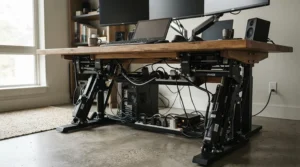
That’s the whole trick. Spines like movement. Fixed furniture doesn’t offer any.
What is a height adjustable desk for bad back?
A height adjustable desk for bad back is a sit-stand desk, usually electric, that raises and lowers at the touch of a button so you can alternate between sitting and standing through the day. The aim is simple: vary your posture, keep your spine moving and match the desk to your body, rather than forcing your body to match a fixed desk.
Is the science settled? Not quite. Wikipedia’s overview of the standing desk notes that sit-stand desks may cut daily sitting time by roughly half an hour to two hours, but it rates that evidence as low quality. So this guide stays honest. I compare seven real desks on what matters for a sore back: a stable dual motor frame, reliable memory preset height desk controls, sensible collision detection and programmable height presets. I also look at whether each one works as an adjustable desk for tall people or only for average heights. Along the way you’ll find setup advice, buyer scenarios and a few myths worth binning.
Top 7 Height Adjustable Desks for Bad Back at a Glance
Short on time? Here’s the lineup. Heights refer to the frame (a desktop adds roughly 2.5 cm), and brands quote slightly different figures across listings, so confirm the exact variant before buying.
| Product | Motor | Height range (approx.) | Memory presets | Best For |
|---|---|---|---|---|
| FlexiSpot E7 Pro | Dual | 63.5–128.5 cm | 4 | Heavy daily use, shared desks |
| Desktronic HomePro | Dual | 63.5–128 cm (with top) | 3–4 (check listing) | Quiet, fast lifting |
| FlexiSpot E8 | Dual | c. 60–125 cm | 4 | Mid-range value |
| FlexiSpot E7H | Dual | up to c. 128–133 cm | 4 | Taller users |
| FlexiSpot EF1 | Single | 71.5–116 cm | Yes (check count) | Tight budgets |
| Desktronic HomeOne | Dual | 72.7–121 cm | Check listing | Budget dual motor |
| MAIDeSITe TH2 Pro Plus Art | Dual | 62–125 cm (some list 127) | 4 | Bring-your-own desktop |
Looking at the table, the dual motor frame designs dominate. Only the FlexiSpot EF1 relies on a single motor, which makes it the cheapest way in and also the one with the narrowest height window. Tall buyers get the most headroom from the FlexiSpot E7H and FlexiSpot E7 Pro, while the Desktronic HomeOne and FlexiSpot EF1 top out too low for anyone much over six foot. The MAIDeSITe TH2 Pro Plus Art is the odd one out: it’s frame-only, so you supply the top.
💬 Just one click — help others make better buying decisions too!😊
Top 7 Height Adjustable Desks for Bad Back: Expert Analysis
Every desk below is judged on what it means for a sore back: stability, speed of position changes, presets, safety features and honest value. Review comments are aggregated sentiment from published reviews and listings, not my own testing.
1. FlexiSpot E7 Pro — dual motor muscle for heavy daily use
The headline feature is stability under load. Two motors, one in each leg, keep the top level even when it’s carrying monitors, a docking station and a small mountain of paperwork.
Published spec sheets put the capacity at 160 kg, the lift speed at around 40 mm/s and the noise below roughly 50 dB. In plain English, a sit-to-stand change takes seconds, so you’ll actually do it, and the motors won’t drown out a video call. Four programmable height presets, collision detection and a child lock sit on the controller. Frame height is usually quoted at about 63.5–128.5 cm, though some older listings cite 58–123 cm, so check the exact model.
Based on the spec comparison, this is the safest “buy once” choice if you sit for six hours or more. A desk that wobbles at standing height tempts you to stop using it. It also suits households where two people share presets.
Reviewers consistently praise the smooth, quiet lift. One hands-on review notes slight wobble at full standing height while typing, though not enough to be a nuisance. The boxed frame weighs roughly 39 kg, so recruit a helper.
Pros:
- ✅ Rock-steady dual motor frame with 160 kg capacity
- ✅ Four presets plus collision detection and child lock
- ✅ Wide range suits most body heights
Cons:
- ❌ Premium money compared with budget frames
- ❌ Heavy to unbox and assemble alone
Frame plus desktop usually sits in the £300–£500 range at the time of research (check current price). Verdict: a premium outlay that makes sense if the desk gets daily use.
2. Desktronic HomePro — whisper-quiet and fast lifting
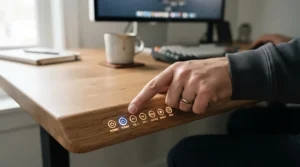
Speed and silence are the party tricks. Desktronic quotes a lift rate of around 50 mm/s and a noise level below 39 dB, quicker and quieter than most rivals here.
The dual-motor, three-stage legs carry up to 160 kg and cover roughly 61–125.5 cm bare, or 63.5–128 cm with a 2.5 cm top. Why does that matter for your back? The easier a position change is, the more often you’ll make one, and short, frequent changes are what NHS back-pain leaflets keep recommending. The brand also lists a five-year warranty, advanced anti-collision and USB-A/USB-C charging in the controller area.
My read: it’s the best fit for open-plan homes, shared rooms or anyone sensitive to motor whine. The wide range covers short and tall users alike.
UK reviewer Walks4All names it best overall for dual motors and presets. One US round-up grumbles that the lacquered tops show fingerprints and that the collision sensor isn’t especially sensitive. Desktronic’s own site shows a very high review score, but that comes from its own widget, so season it with salt.
Pros:
- ✅ Quick, quiet dual motor lift
- ✅ Wide 63.5–128 cm range with top fitted
- ✅ Five-year warranty and USB charging
Cons:
- ❌ Lacquered tops can show fingerprints
- ❌ Collision sensitivity described as modest
Roughly £300–£450 depending on desktop size (check current price). Strong value for a quiet, premium-feeling build.
3. FlexiSpot E8 — mid-range dual motor without the premium tag
The standout is that it keeps the dual motor frame but trims capacity to land below the E7 family.
FlexiSpot UK lists a 38 mm/s lift speed, a 125 kg capacity and a maximum height around 125 cm. UK buyer’s guides add four-button memory and collision detection. In practice, 125 kg comfortably handles two monitors, a laptop and a speaker, and 125 cm of height is plenty for people up to about 185 cm. By FlexiSpot’s own formula (height ÷ 1.58), a 185 cm person needs roughly 117 cm when standing.
This is the sensible pick if you want programmable height presets and a proper dual motor frame but don’t need a heavy-duty rating. I found far fewer independent hands-on reviews of the E8 than of the E7 Pro, so this verdict leans on specs and FlexiSpot’s own comparison, which positions it as the slightly cheaper sibling.
Pros:
- ✅ Dual motor stability at a gentler price
- ✅ Four memory presets
- ✅ Anti-collision protection included
Cons:
- ❌ Lower 125 kg capacity than the E7 Pro
- ❌ Not tall enough for much over 185 cm
Roughly £300–£450 at the time of research (check current price). Good value for average-height buyers.
4. FlexiSpot E7H — extra headroom for taller users
This is the E7 stretched upwards, built for people who find standard desks leave them hunching.
Sources quote a maximum working height between roughly 128 and 133 cm depending on whether desktop thickness is counted, and capacity of 125–160 kg depending on variant, so check the listing carefully. It’s a dual motor frame with four presets. One test notes a single press sends the desk straight to standing height, and warns that the mains cable must reach at full extension. Plug placement is worth planning.
For a bad back, desk height matters more than most people realise. A desk that’s too low pulls tall users into a forward slump, so an adjustable desk for tall people isn’t a luxury. Honestly, it’s the whole point.
Most independent coverage I found is in German-language tests, which liked the controller and range. UK-specific reviews are thinner.
Pros:
- ✅ Among the tallest ranges in this lineup
- ✅ Dual motor frame with four presets
- ✅ One-touch preset recall
Cons:
- ❌ Specs vary between sources and variants
- ❌ Costs more than the standard E7 and E8
Around £400–£550 (check current price). Worth it only if you genuinely need the extra height.
5. FlexiSpot EF1 — budget route with presets and collision detection
The surprise is that a budget single-motor desk still carries memory presets and collision detection. FlexiSpot’s own comparison says exactly that for the EF1.
The listing shows a 71.5–116 cm range, 100 kg capacity and a light 21 kg frame. By FlexiSpot’s height formulas, that range suits people roughly 1.75–1.85 m. Shorter users will probably need a footrest, and taller users will run out of standing height.
Treat it as the “try before you commit” option. If you’re unsure you’ll stand at all, spending less is sensible. A single motor is generally slower and more audible, and it’s less forgiving of heavy monitor arms. I couldn’t verify enough independent reviews to summarise real-world sentiment fairly, so check recent buyer feedback on the listing.
Pros:
- ✅ Lowest entry cost in this guide
- ✅ Presets and collision detection included
- ✅ Light and easier to assemble
Cons:
- ❌ Single motor means slower lifting
- ❌ 100 kg and 116 cm ceilings limit tall users
Generally in the budget tier, broadly under £250 (check current price). Great value for light setups, poor value for tall or heavy ones.

6. Desktronic HomeOne — smaller dual motor value pick
The appeal is simple: dual motors for less money than the Desktronic HomePro.
Desktronic’s comparison page lists a 120 kg capacity, a 72.7–121 cm range, desktops from 120×60 to 200×80 cm and a five-year warranty. The brand says it suits people from 152 to 192 cm. The 72.7 cm minimum looks high for the shortest end, so shorter users should check chair height and plan on a footrest. Walks4All describes it as a very similar, more affordable alternative to the HomePro.
Here’s what the spec sheet won’t tell you: 121 cm of maximum height is the real limit. Anyone approaching 190 cm will be eyeing the top of the range, with no spare height to fine-tune. Confirm the number of memory presets on the listing before buying.
I couldn’t find enough independent reviews for a confident sentiment summary, so lean on the brand’s specs and the HomePro comparison.
Pros:
- ✅ Dual motor frame at a friendlier price
- ✅ Wide choice of desktop sizes
- ✅ Five-year warranty
Cons:
- ❌ Tops out at 121 cm for tall users
- ❌ Lower 120 kg capacity than the HomePro
Roughly £250–£400 depending on desktop (check current price). Good value for average-height buyers.
7. MAIDeSITe TH2 Pro Plus Art — frame-only flexibility with 180 kg capacity
The standout is freedom. This is a frame you pair with your own desktop, whether a favourite 160×80 cm slab, solid wood or an existing top.
Listings describe a dual motor frame with 62–125 cm travel (Walks4All cites 62–127 cm), a claimed 180 kg capacity, four presets, a child lock and USB charging. It’s rated below roughly 45 dB and accepts desktops from about 100 to 220 cm wide. The manual lets you adjust collision-sensor sensitivity, which is handy if your setup triggers false stops.
Amazon-listing reviews praise the quiet, quick motor and stability. One buyer prone to lower back pain bought it for exactly that reason. A 6 ft 3 in reviewer says it comfortably exceeds their standing height. One owner reports a locking and collision problem, so keep your receipt.
Pros:
- ✅ Use your own desktop and save money
- ✅ Four presets and child safety lock
- ✅ High claimed capacity for heavy setups
Cons:
- ❌ You must source and drill a desktop
- ❌ Isolated reports of collision-sensor faults
Frame-only roughly £250–£400 (check current price). Excellent value if you already own a good desktop.
How to Set Up a Height Adjustable Desk for Bad Back (Step by Step)
Unboxing is the easy part. Getting the geometry right is what protects your spine.
- Build it with a second pair of hands. Boxed frames like the FlexiSpot E7 Pro weigh around 39 kg.
- Mount the controller properly, then reset. The MAIDeSITe manual says to fix the control panel horizontally under the desktop and reset the desk on first use. Read your own manual for equivalents.
- Find your two heights. Seated, your elbows should sit near 90 degrees with forearms level and feet flat. Standing, keep the same elbow angle with your spine neutral. Save both as presets. For screen and chair set-up, the HSE’s display screen equipment guidance (L26) is the UK’s official reference.
- Add a third height. A perching or leaning position gives your back a break from both extremes.
- Change position every 30 to 60 minutes. That’s the range NHS hospital leaflets give. I’d begin with 10 to 15 minutes of standing at a time (a sensible starting point, not medical advice) and build gradually.
The classic first-month mistakes are standing rigidly still, locking your knees and leaving the monitor at seated height. If pain sharpens, stop and speak to your GP or physio.
✨ Ready to Take the Strain Off Your Back?
🔍 Click any highlighted product name to check current pricing and availability on Amazon UK, then pick the one that matches your height, budget and workspace. A few minutes of comparison now could mean years of more comfortable working days!

Real-World Scenarios: Which Desk Fits Which Life?
These are illustrative situations, not customer testimonials.
The 5 ft 4 in analyst on a modest budget. If you’re around 163 cm, work from a spare bedroom, use two monitors and sit most of the day, you want a quiet dual motor frame with a low minimum height. By the height ÷ 2.48 formula, your seated desk height is roughly 66 cm. The Desktronic HomePro (63.5 cm minimum with top) or FlexiSpot E8 fit well, while the FlexiSpot EF1 starts too high without a footrest.
The 6 ft 5 in developer with three screens. At about 196 cm, your ideal heights are roughly 79 cm seated and 124 cm standing, with heavy monitor loads on top. The FlexiSpot E7H or FlexiSpot E7 Pro are the sensible shortlist, and the 160 kg rating gives room for arms and docks.
The renter with a favourite desktop. If you own a solid 160×80 cm top you love and don’t want to bin it, the MAIDeSITe TH2 Pro Plus Art lets you keep it and add four presets for two or three hours of standing a day. Check the deposit rules on drilling first.
Problem → Solution: Fixing Common Desk Frustrations
- The desk stops mid-lift for no reason. Check for cables, chair legs or bags under the desk, since collision detection is doing its job. On frames like the MAIDeSITe TH2 Pro Plus Art you can adjust sensor sensitivity, and the controller must be fixed firmly.
- Wobble at full height. Extend only as far as you need, level the feet and retighten bolts after the first month. If wobble persists, a heavier-duty dual motor frame such as the FlexiSpot E7 Pro is the structural fix.
- Presets vanish or drift. Many frames need a reset after a power cut. Follow your manual’s calibration routine, then re-save your heights.
- Your back still aches after standing. You’re probably standing too long or too rigidly. Shorten the bouts, alternate three positions and keep moving. If pain persists, see a professional.
How to Choose a Height Adjustable Desk for Bad Back
- Work out your two key heights. Seated height ≈ body height ÷ 2.48, standing ≈ body height ÷ 1.58 (FlexiSpot’s rule of thumb). A 175 cm person needs roughly 71 cm and 111 cm.
- Prefer a dual motor frame. It’s quicker, steadier under load and less wobbly. Go single motor only when budget forces it.
- Insist on programmable height presets. Two is the minimum. Four helps if you share.
- Check collision detection and a child lock. Both matter in busy homes.
- Match capacity to your kit. Add monitors, arms, dock and desktop weight, then leave a margin.
- Check desktop depth. Around 70–80 cm helps keep screens at a comfortable distance.
- Pair it with an adjustable chair. Even the best sit-stand desk can’t fix a poor seat.
The evidence is more modest than the marketing. A systematic review and meta-analysis in the journal Ergonomics found sit-stand workstations may reduce low back discomfort. The authors noted a shortage of studies on people who already have back pain and on how much sit-stand time is ideal.
Adjustable Desk for Tall People: Getting the Height Right
Tall buyers face a blunt problem: many “adjustable” desks simply don’t go high enough. Using FlexiSpot’s formulas, a 190 cm person needs about 77 cm seated and 120 cm standing. At 200 cm, that becomes roughly 81 cm and 127 cm.
Against those figures, the FlexiSpot E7H and FlexiSpot E7 Pro (up to around 128.5 cm) have the most headroom. The Desktronic HomePro reaches about 128 cm with its top fitted. The MAIDeSITe TH2 Pro Plus Art (62–125 cm on most listings) gets tight near 200 cm. The FlexiSpot E8, Desktronic HomeOne and FlexiSpot EF1 are better kept for average-height users.
Two quirks catch people out. Plug sockets: the FlexiSpot E7H test warns the mains cable must reach at full extension. Legroom: deeper desktops and wider frames stop knees clipping crossbars. For a bad back, the cost of getting this wrong is a permanent forward hunch, so a genuine adjustable desk for tall people is worth the extra pounds.
Dual Motor Frame vs Single Motor: What You Actually Gain
| Feature | Single motor | Dual motor frame |
|---|---|---|
| Lift speed | Slower, more audible | Quicker (38–50 mm/s on desks above) |
| Stability at height | More wobble risk with heavy tops | Better support, one motor per leg |
| Typical load | Around 100 kg (FlexiSpot EF1) | 120–180 kg listed |
| Best For | Light setups, tight budgets | Daily use, multiple monitors, shared desks |
The pattern is clear. A dual motor frame like the Desktronic HomePro or FlexiSpot E7 Pro lifts faster and carries more, and speed and stability both feed straight into whether you use the desk. If you only stand occasionally and run one monitor, the FlexiSpot EF1 may be all you need. If your desk is your daily workbench, a dual motor frame is the better long-term bet.
Memory Preset Height Desk Features: Why Programmable Height Presets Matter
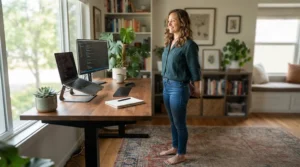
A memory preset height desk turns a fiddly manual adjustment into a single button press. For a bad back that matters, because friction is the enemy of movement. If changing position takes thirty seconds of hunting for the right height, you’ll skip it.
Programmable height presets let you save a seated height, a standing height and a third “change-up” position such as perching. Frames like the FlexiSpot E7 Pro, FlexiSpot E8 and MAIDeSITe TH2 Pro Plus Art offer four slots, so two people can each save their own pair. Some, such as the MAIDeSITe TH2 Pro Plus Art, also add sit-stand reminders.
One buying guide argues two presets are enough, and for a solo user I’d agree. Shared desks are a different story, where four earns its keep. On the Desktronic HomePro, sources vary between three and four slots, so check the listing.
Collision Detection: Safety Feature or Annoyance?
Collision detection stops or reverses the desk when it meets resistance, protecting chairs, drawers, pets and toes. Different brands use different sensors, from Hall-effect designs to gyroscope-based ones, but the principle is the same.
Don’t treat it as a guarantee. One round-up calls the Desktronic HomePro sensor “not highly sensitive”, while one MAIDeSITe TH2 Pro Plus Art owner reports it not working properly. The MAIDeSITe TH2 Pro Plus Art manual lets you tune sensitivity, which is a sensible feature if your desk has heavy monitor arms. Test it once with a soft object under the desk.
A child lock, a clear space under the desk and a quick glance before each move are still your real safety system. When buying, look for UKCA or CE marking and proper electrical safety documentation on any electric desk.
Height Adjustable Desk for Bad Back vs Alternatives
| Option | Back-friendliness | Cost | Best For |
|---|---|---|---|
| Fixed desk | Static, no position change | Lowest | Short, occasional desk use |
| Desk riser (sits on desktop) | Allows standing, limited ergonomics | Low | Tight budgets, rentals |
| Height adjustable desk | Full sit-stand range, presets | Mid–high | Daily desk workers with back pain |
| Standing-only desk | Static standing | Mid | Short tasks only |
Looking at the comparison, a full sit-stand desk offers the best range of positions, while a riser gets you partway for much less money. A fixed desk offers none of the movement that NHS back-pain leaflets keep recommending. The FlexiSpot EF1 sits at the budget end of true sit-stand desks if you want a step up from a riser.
Long-Term Cost & Maintenance
| Product | Price range (check current price) | Value verdict | Best For |
|---|---|---|---|
| FlexiSpot E7 Pro | £300–£500 | Premium, durable | Heavy daily use |
| Desktronic HomePro | £300–£450 | Strong value | Quiet, fast lifting |
| FlexiSpot E8 | £300–£450 | Solid mid-range | Average heights |
| FlexiSpot E7H | £400–£550 | Worth it if tall | Taller users |
| FlexiSpot EF1 | Under c. £250 | Entry-level | Light use |
| Desktronic HomeOne | £250–£400 | Good dual motor value | Budget dual motor |
| MAIDeSITe TH2 Pro Plus Art | £250–£400 (frame only) | Flexible | Own desktop |
Ranges are indicative, include a typical desktop where one is sold, and change often. The most expensive desk costs a few extra pounds a month over its life. A desk costing around £400 and used for seven years works out at roughly 16p a day. For maintenance, retighten bolts after the first month, keep cables slack, wipe the columns and never exceed the load rating.
FAQ
❓ How long should I stand each day with a height adjustable desk for bad back?
❓ Can two people share a memory preset height desk?
❓ Can I add a dual motor frame to my existing desktop?
❓ Do I need a special chair with an adjustable desk for tall people?
❓ Is a collision detection system enough to make a desk safe around children?
Conclusion
Choosing a height adjustable desk for bad back relief comes down to matching the desk to your height, budget and habits. The FlexiSpot E7 Pro is my pick for heavy daily use, the Desktronic HomePro for quiet speed, and the FlexiSpot E7H for taller users. The FlexiSpot E8 and Desktronic HomeOne suit average-height buyers watching costs. The MAIDeSITe TH2 Pro Plus Art lets you keep your existing desktop, and the FlexiSpot EF1 is the low-risk starter.
Whatever you buy, remember that the desk is a tool, not a treatment. Movement does the work, which is why NHS guidance on sitting correctly emphasises posture and changing position. If you have persistent or severe back pain, speak to your GP or a physiotherapist before changing your routine.
Recommended for You
- Standing Desk For Small Flat: 7 Best Space-Saving Picks (2026)
- 3 Piece Dining Sets: 7 Best Space-Saving Picks For UK (2026)
- Dining Table And Chairs Sets: 7 Best Picks For UK Homes (2026)
Disclaimer: This article contains affiliate links. As an Amazon Associate, I earn from qualifying purchases. If you purchase products through these links, we may earn a small commission at no additional cost to you.
✨ Found this helpful? Share it with your friends! 💬🤗
